
Quick Start
Download your first video in under 30 seconds.
Step 1: Copy the Video URL
Go to the website (YouTube, TikTok, Instagram, etc.) and copy the video URL from the address bar or share button.
Step 2: Paste and Fetch
Open XGetter, navigate to the appropriate platform in the sidebar, and paste the URL into the input field. Click the search button (or press Enter).

XGetter will fetch the video information including title, thumbnail, duration, and available formats.
Step 3: Download
Choose your preferred format:
- Best Video — Highest quality video (usually MP4)
- Audio — Extract audio only (M4A or MP3)
- All formats — Expand to see every available quality option

Select a save location (or use your default folder from Settings), and the download begins.
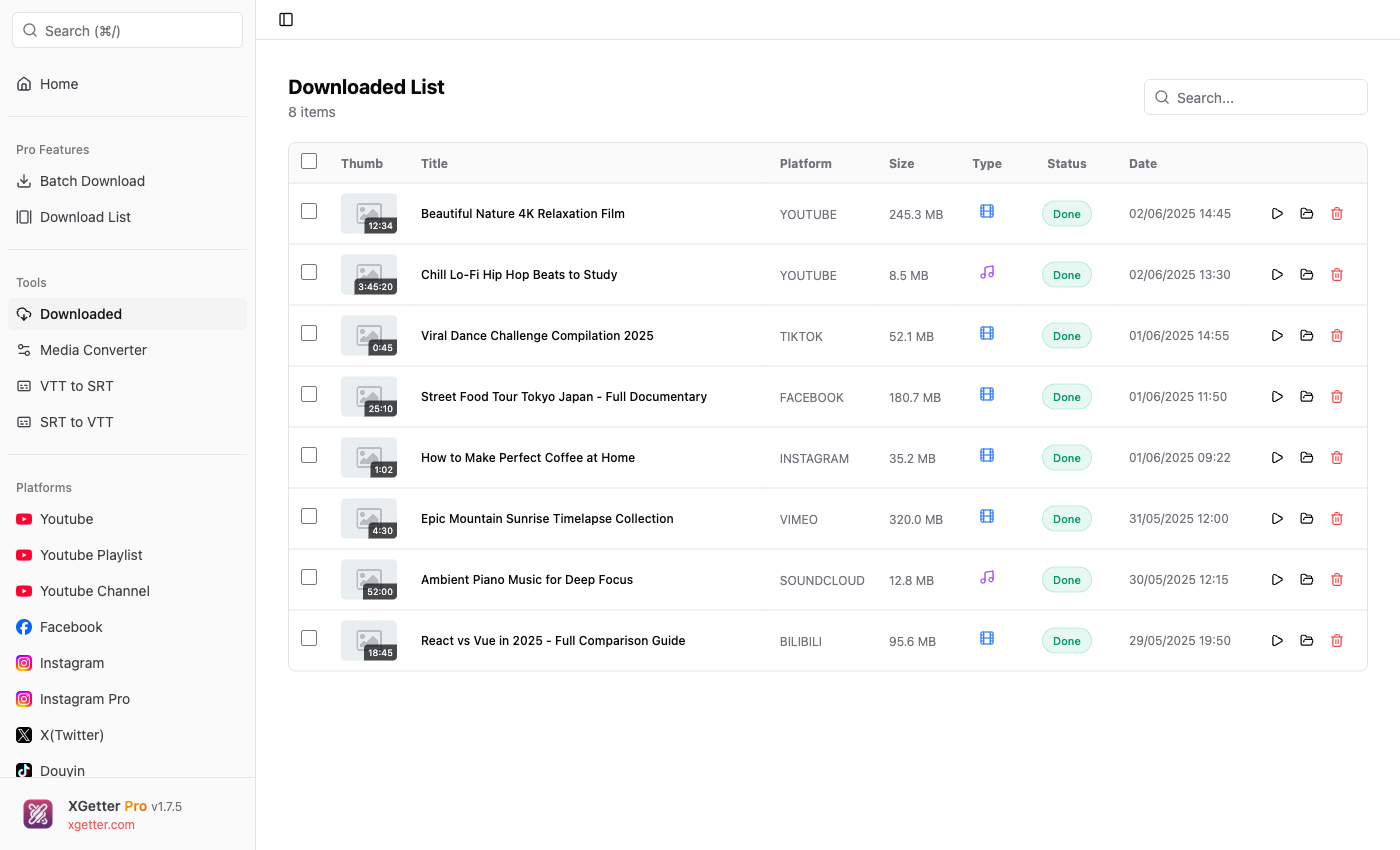
Track Your Downloads
Go to Downloaded in the sidebar to see all your download history. From there you can:
- Play the downloaded file
- Open the containing folder
- See download status and file size
Tips
Auto-detect Platform
You can use the Home page to search for any platform, or simply paste any supported URL — XGetter detects the platform automatically.
Set Default Folder
Go to Settings → set your default download folder to skip the folder picker every time.
Next Steps
- YouTube Guide — YouTube-specific features
- Pro Features — Unlock batch download, cut media, and more